
Building Dawn.Chat
Over at FORTYEIGHT we build the transparency as a service (TaaS) platform of the future. The pandemic and the new remote work life has not just impacted us but millions of people worldwide. So we decided to build a product leveraging our TaaS platform in order to help people connect more easily during these times, strengthen team communication and positively impact teams. Dawn.Chat gives users the ability to speak to each other during a friendly wakeup call
, the only required steps are:
- Users who like to receive a wakeup call need to send a scheduling message to a phone number.
- Users who want to pay it forwards can call a phone number during opening times to be connected to users who requested wakeup calls.
In the remainder of the article we’re going to look at Dawn.Chat from a technical point of view, starting from the big picture all the way down to the actual code.
The Big Picture
In order to be able to scale from zero to millions we rely on an entirely serverless infrastructure. Serverless Framework provides us with Infrastructure as Code (IaC) in form of CloudFormation and does all of the heavy lifting maintaining the necessary Lambdas and the API Gateway fronting those Lambdas. We use Python 3.8 throughout our Lambdas. For data persistence we use DynamoDB which interacts nicely with Serverless Framework and our Lambdas, besides that it comes with neat features like TTL, streams, and much more. Twilio completes our tech stack providing us with voice and messaging infrastructure.
The below graphic serves as a big picture overview of the cogs involved. The API Gateway fronts everything and various Lambdas connect the data streams. In general there’s the inbound voice and message cases to distinguish which trigger different cadences of Lambda executions.
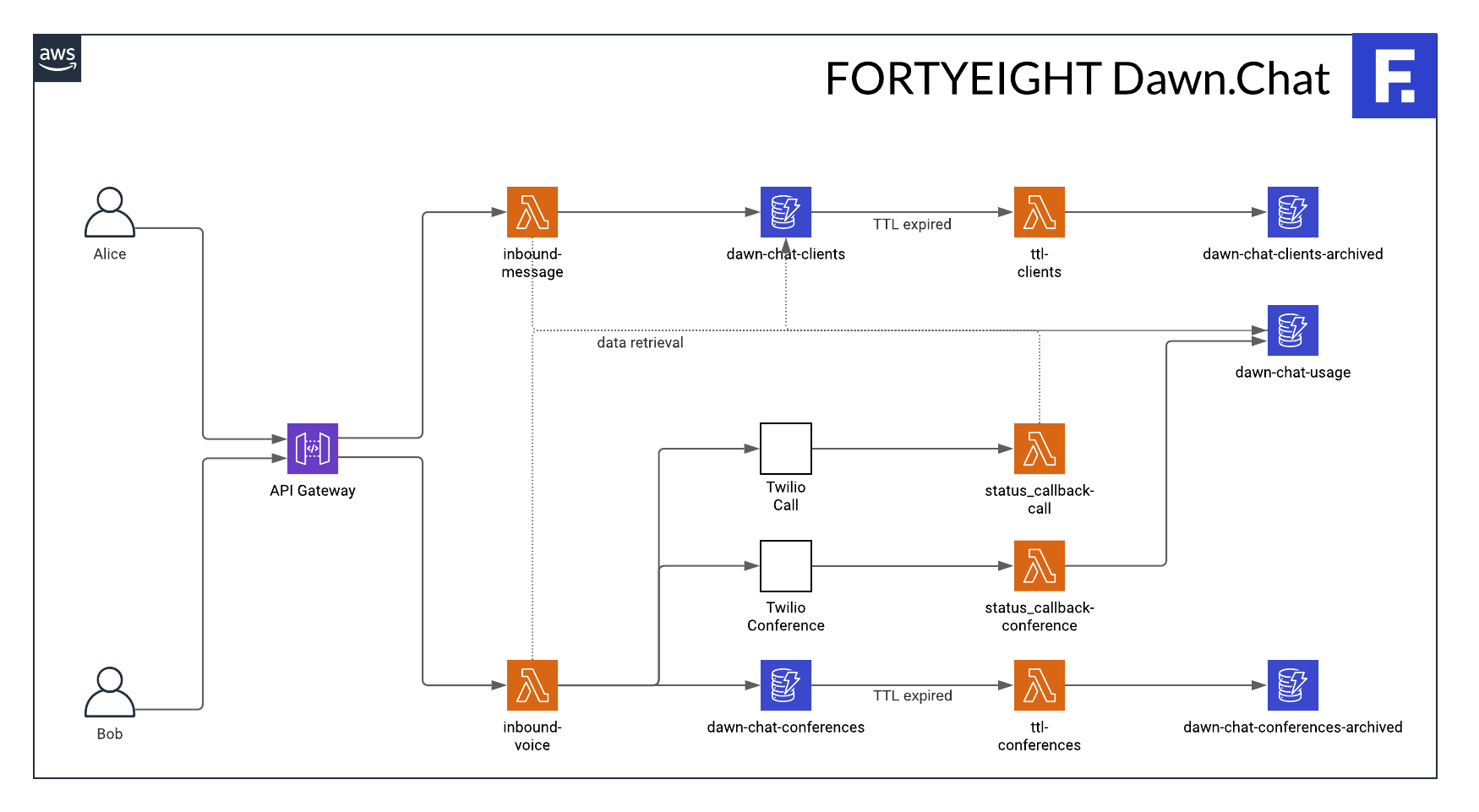
Software Architecture Overview
Let’s look at an simplified view of the flow using a sequence diagram. The person requesting the wakeup call, here Alice, usually sends a SMS 📨 the evening before. She chooses a time slot during the opening times, e.g. between 08:00 - 09:00 local time, and then gets a confirmation that her wakeup call was scheduled. Bob now calls 📞 the next morning during the opening times and gets matched with a scheduled wakeup call, in this case Alice’s request. The system then creates a new personal conference and first dials Bob in and subsequently Alice.
In the rest of the article we’re going to look at the code enabling users to auto-magically connect with each other. In order to keep it simple we’re only going to cover the two core Lambdas and the essential parts of the Serverless setup.
Serverless Setup
service: fortyeight-dawn-chat
useDotenv: true
frameworkVersion: '2'

provider:
  name: aws
  runtime: python3.8
  stage: ${opt:stage, 'local'}
  region: eu-west-2
  profile: fortyeight
  tracing:
    apiGateway: true
    lambda: true
  environment:
    TWILIO_ACCOUNT_SID: ${env:TWILIO_ACCOUNT_SID}
    TWILIO_AUTH_TOKEN: ${env:TWILIO_AUTH_TOKEN}
    CLIENTS_TABLE: ${self:resources.Resources.clientsTable.Properties.TableName}
    URL_STATUS_CALLBACK_CALL: https://xxxxx/status_callback/call
    URL_STATUS_CALLBACK_CONFERENCE: https://xxxxx/status_callback/conference
  lambdaHashingVersion: 20201221
  iamRoleStatements:
    - Effect: "Allow"
      Action:
        - dynamodb:DescribeTable
        - dynamodb:Query
        - dynamodb:Scan
        - dynamodb:GetItem
        - dynamodb:PutItem
        - dynamodb:UpdateItem
        - dynamodb:DescribeStream
        - dynamodb:GetRecords
        - dynamodb:GetShardIterator
        - dynamodb:ListStreams
      Resource:
        - arn:aws:dynamodb:eu-west-2:xxxxxxxxxxxx:table/fortyeight-${self:provider.stage}-dawn-chat-clients
        - arn:aws:dynamodb:eu-west-2:xxxxxxxxxxxx:table/fortyeight-${self:provider.stage}-dawn-chat-clients/index/*

plugins:
  - serverless-python-requirements
The provider section of our serverless.yaml is pretty straight-forward so just some pointers where it deviates from standards or notes are necessary:
- We use a named AWS profile to deploy our serverless infrastructure,
profile: fortyeightinstructs Serverless Framework to use the one namedfortyeight. - The
tracingsection enables AWS X-Ray Tracing support for API Gateway and Lambdas by settingapiGateway: trueandlambda: true, this helps immensely when debugging the system. - We pass secrets to our Lambdas via environment variables in the
environmentsection, - and allow access to the DynamoDB table which we’re going to define in the next section in the in
iamRoleStatementssection.
resources:
  Resources:
    clientsTable:
      Type: AWS::DynamoDB::Table
      Properties:
        TableName: fortyeight-${self:provider.stage}-dawn-chat-clients
        BillingMode: PAY_PER_REQUEST
        AttributeDefinitions:
          - AttributeName: phoneNumberFrom
            AttributeType: S
          - AttributeName: group
            AttributeType: S
          - AttributeName: desiredTimestamp
            AttributeType: S
        KeySchema:
          - AttributeName: phoneNumberFrom
            KeyType: HASH
        GlobalSecondaryIndexes:
          - IndexName: byGroupAndDesiredTimestamp
            KeySchema:
              - AttributeName: group
                KeyType: HASH
              - AttributeName: desiredTimestamp
                KeyType: RANGE
            Projection:
              ProjectionType: ALL
In resources we define the DynamoDB table which will hold the scheduled wakeup calls. The primary index is by phoneNumberFrom and the secondary index is a composite key by group and desiredTimestamp to aid in matching callers to scheduled wakeup calls. phoneNumberFrom holds the phone number in
E.164 format from which the request for the wakeup call was received. In the matching process this will become the callee. group is the phone number the requester messaged to schedule the wakeup call, this allows for multitenancy and doesn’t have to be a phone number but can also be the nickname of a group. And lastly desiredTimestamp holds the ISO 8601 timestamp for the scheduled wakeup call.
functions:
  inbound-message:
    handler: dawn.inbound.message
    name: fortyeight-${self:provider.stage}-dawn-chat-inbound-message
    events:
      - http:
          path: inbound/message
          method: post
  inbound-voice:
    handler: dawn.inbound.voice
    name: fortyeight-${self:provider.stage}-dawn-chat-inbound-voice
    events:
      - http:
          path: inbound/voice
          method: post
  status-callback-call:
    handler: dawn.status_callback.call
    name: fortyeight-${self:provider.stage}-dawn-chat-status-callback-call
    events:
      - http:
          path: status_callback/call
          method: post
  status-callback-conference:
    handler: dawn.status_callback.conference
    name: fortyeight-${self:provider.stage}-dawn-chat-status-callback-conference
    events:
      - http:
          path: status_callback/conference
          method: post
We define four HTTP POST Lambda functions:
dawn.inbound.messagewill handle incoming text messages from Twilio, e.g. SMS.dawn.inbound.voicewill handle incoming voice calls from Twilio.dawn.status_callback.callanddawn.status_callback.conferenceare used to execute code on certain events in the lifecycle of a Twilio call / conference.
Dependencies
In the serverless.yaml we added the serverless-python-requirements plugin in order to automatically package our Python requirements. Make sure that you have a requirements.txt in the same folder as your serverless.yaml with your project dependencies. For our example we’ll need the Twilio Python helper library and pytz.
Lambda Code
Inbound Message
from datetime import datetime
import pytz
from twilio.twiml.messaging_response import MessagingResponse
from urllib.parse import parse_qs

from dawn import dynamodb


def get_tz(query):
    assert isinstance(query, str)
    query = query.lower().replace(' ', '_')
    # We're sorting by length of the entries first so
    # that obvious matches like GMT or EST match before
    # finding the substring in another entry, e.g. EST
    # in "Creston"
    for tz in sorted(pytz.all_timezones, key=len):
        if query in tz.lower():
            return tz
    return None


def message(event, context):
    data = parse_qs(event.get('body', ''), keep_blank_values=True)
    from_ = data.get('From')
    group = data.get('To')
    body = data.get('Body')
    # Split body text using spaces, i.e.
    # 'Wakeup 8.30am London' becomes:
    # ['Wakeup', '8.30am', 'London']
    inputs = body.split(' ')
    dt = datetime.strptime(inputs[1], '%I.%M%p')
    tz = get_tz(inputs[2])

    # Persist request for a wakeup call
    dynamodb.update_client(
        phone_number_from=from_,
        group=group,
        timezone_=tz,
        desired_timestamp=dt
    )

    response = MessagingResponse()
    response.message('Successfully scheduled your call!')
    return {
        'statusCode': 200,
        'headers': {
            'Content-Type': 'application/xml'
        },
        'body': str(response)
    }
When handling an inbound message we need to parse the body of the incoming message and then persist the data in DynamoDB.
We allow users to schedule their wakeup calls in a variety of formats, e.g. Wakeup 8.30am London, hence we need to parse the date and time as well as the timezone. The date and time is parsed with strptime, '%I.%M%p' is just one of the formats we accept in the production version of Dawn.Chat. Also note that additionally logic is needed to determine whether the wakeup call is actually on the next day, when the user requests it before midnight or on the same day, when the user requests it after midnight. The timezone is matched against pytz.all_timezones which returns a collection of all known pytz timezone objects, e.g. users can submit their timezone by writing London, GMT, or Barbados.
When saving the data in DynamoDB (dynamodb.update_client, code not shown) the timestamp will be saved as an UTC timestamp so that all future date and time operations can be performed on UTC timestamps.
In the end we return a message with the content Successfully scheduled your call! via the Twilio MessagingResponse object which when converted to a str returns TwiML.
Inbound Voice
from twilio.rest import Client
from twilio.twiml.voice_response import Dial, VoiceResponse
from urllib.parse import parse_qs
from uuid import uuid4

from dawn import dynamodb


def message(event, context):
    data = parse_qs(event.get('body', ''), keep_blank_values=True)
    from_ = data.get('From')
    group = data.get('To')

    # Get a matching user who requested a wakeup call
    to = dynamodb.get_next_scheduled_client(group=group)

    # Get a unique conference id
    conference_id = str(uuid4())

    # Create TwiML for the caller
    response = VoiceResponse()
    response.say('Welcome to dawn.chat, powered by FORTYEIGHT.')
    response.say('Please hold while we\'re connecting you to another party...')
    response.pause(length=1)
    dial = Dial()
    dial.conference(
        conference_id,
        end_conference_on_exit=True,
        start_conference_on_enter=False,
        max_participants=2,
        status_callback=os.getenv('URL_STATUS_CALLBACK_CONFERENCE'),
        status_callback_event='join end'
    )
    response.append(dial)

    # Create TwiML for the callee
    response_recipient = VoiceResponse()
    response_recipient.say('Welcome to dawn.chat, powered by FORTYEIGHT.')
    response_recipient.say('Someone is on the line to say hi, please hold while we\'re connecting you...')
    dial = Dial()
    dial.conference(
        conference_id,
        end_conference_on_exit=True,
        start_conference_on_enter=True
    )
    response_recipient.append(dial)
    client = Client(os.getenv('TWILIO_ACCOUNT_SID'), os.getenv('TWILIO_AUTH_TOKEN'))
    client.calls.create(
        twiml=str(response_recipient),
        to=to,
        from_=group,
        status_callback=os.getenv('URL_STATUS_CALLBACK_CALL'),
        status_callback_event=['completed']
    )

    return {
        'statusCode': 200,
        'headers': {
            'Content-Type': 'application/xml'
        },
        'body': str(response)
    }
Next let’s look at what happens when a call is received:
- Similar to when receiving a message we need to extract the passed attributes,
parse_qsis our friend here again. - Next we find a scheduled wakeup call (
dynamodb.get_next_scheduled_client(group=group), code not shown), this uses the secondary index in combination with the group and the current time to find the closest matching user who requested to be called. - With
uuid4()we generate a unique conference id, we set this as the room name for the conference but we also use this to track the conference internally (hence why we call itconference_idand not room name, the code for tracking is not shown here). - We form an empty
VoiceResponse()and start to fill it, the TwiML whichresponsegenerates is what eventually gets returned to the user who called. dial.conference()will generate the TwiML to connect the user who called to the new conference.- Next we form another empty
VoiceResponse(), this is the base forresponse_recipientwhich is going to be the TwiML for the user to be called, the user who scheduled the wakeup call. client.calls.create()is placing a new outbound call to the user to be called (the user who scheduled the wakeup call), we use theresponse_recipientTwiML here, this will dial in this user into the same conference as the user who called as we’re using the sameconference_idindial.conference().- This will return immediately and we then return
responseto the user who called. They will hear the greeting and will be placed on hold in the new conference. - Note how we connected the
status_callbackof the conference and the call, we’ll get notified when the conference starts, ends and when the call is completed.
Conclusion
We’ve seen how we can build a truly connected state-of-the art communication application with only a few lines of code. We harnessed the power of serverless computing and a cloud communications platform as a service (CPaaS) provider all in all to deliver a great and simple user experience.
We left out quite a few bits, e.g. error handling, edge cases, logging and tracing, monitoring, scalability questions, timezone handling, gathering usage statistics, or automatically expiring items to preserve privacy. You should have now the baseline to explore those topics, and more, in the Twilio, AWS and Serverless documentation to expand your application.